Anyone who wants to learn English, Japanese or Korean has probably been in this exact spot: instead of lacking study materials, you’re overwhelmed by too many choices and have no clue where to start. You might excitedly grab a vocabulary book, leave it on your desk after two or three days to gather dust; or save a whole playlist of YouTube tutorials, but only watch the first episode; or even download several language learning apps at once, get daily notifications, yet not finish a single lesson for a whole week. This frustrating situation of wanting to learn but struggling to stick with it is way too common.
If you’re the type who wants to master a foreign language but struggles to squeeze in an hour a day to study properly, the design logic of Duolingo will definitely feel super appealing.
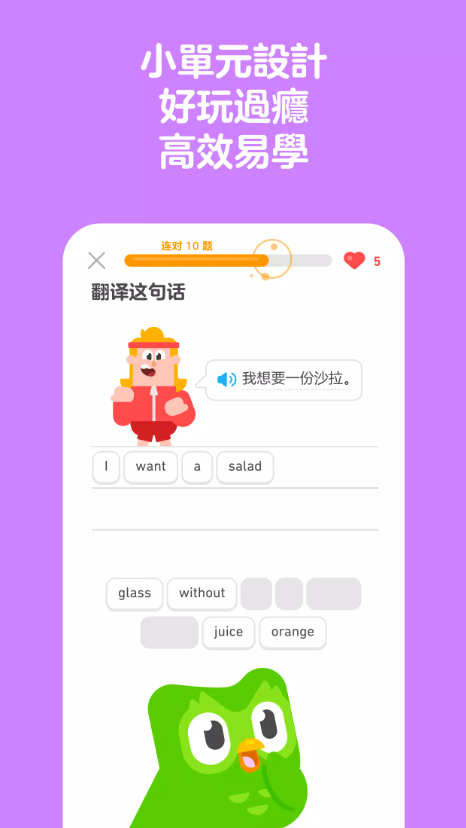
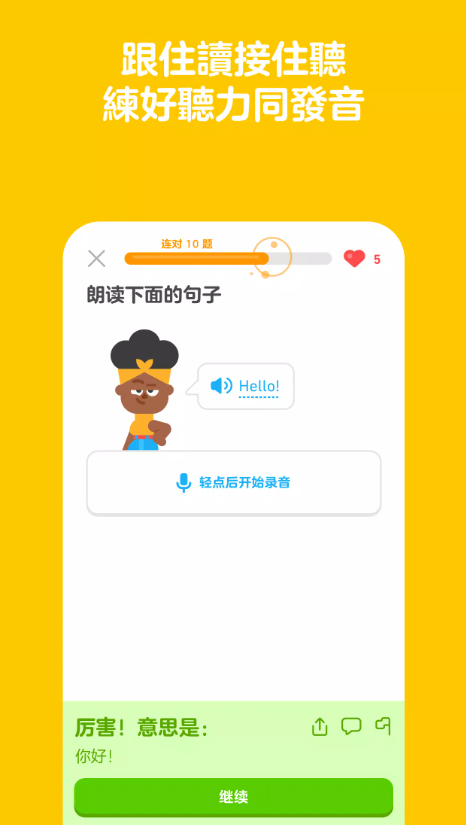
Duolingo, also known as “Duolingo” to many, its biggest highlight isn’t turning your phone into a traditional language tutoring center—it breaks learning into tiny, super short lessons. You might only have 5 minutes while waiting for the subway, learn a few words, practice pronunciation, and do some translation exercises… before you know it, you’re opening the app every day, hooked on streaks, XP points, leaderboards, and daily challenges without even noticing it.
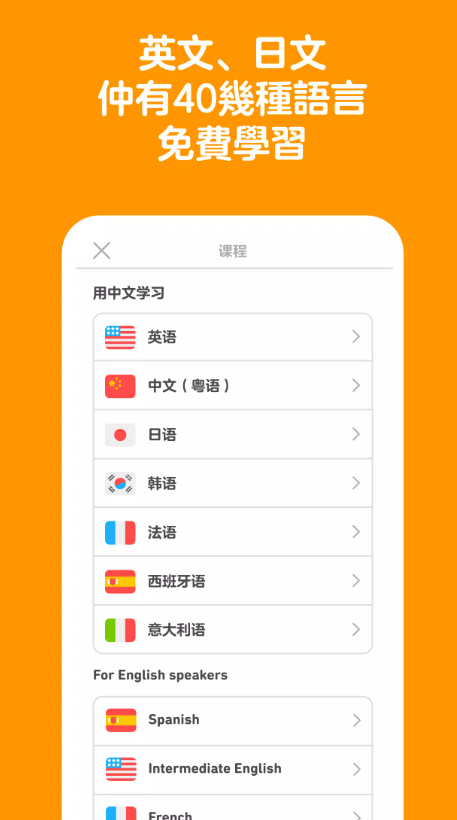
By the 2026 version, Duolingo isn’t just a simple vocabulary translation tool anymore. The platform now offers over 40 languages and more than 100 courses. Beyond popular picks like English, Spanish, French, Japanese, and Korean, it’s constantly rolling out more comprehensive listening, speaking, reading, and writing practice modules. The “Duolingo - Learn Languages Fast” (Taiwan App Store version of Duolingo-Rapid learning of foreign languages) also officially supports traditional Chinese, and has long maintained a really high ranking in education apps.
However, Duolingo isn’t some magic tool that makes you fluent in 3 months just by spending 10 minutes a day. It’s great for building a solid language foundation, getting consistent exposure to the language, and keeping up your learning habit—but if your goal is acing exams, advanced writing, business presentations, or natural conversational skills, you’ll need to pair it with other resources down the line.
Next, I’ll break down everything from download methods, language options, daily streak mechanics, free vs paid differences, all the way to what I think are the most effective ways to use it.
I. Overview of Duolingo Learn Languages App
A. Brand Positioning & Product Features
Duolingo’s core positioning has always been clear: Make learning a foreign language as fun and easy as playing a mobile game.
Most language textbooks out there start with stuff like “Lesson 1: Self-Introduction” or “Lesson 2: Present Tense”, followed by long blocks of grammar explanations.
But Duolingo does things totally differently.
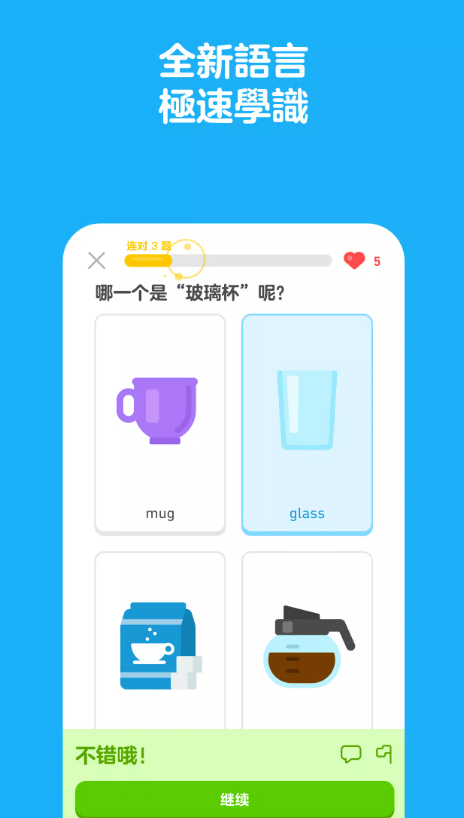
It splits content into tons of short lessons, each covering just a tiny piece of knowledge—like greeting people, ordering at a restaurant, numbers, family members, travel basics, giving directions, telling time, work scenarios, daily shopping, and more.
After each lesson, you’ll do exercises right away. If you get it right, you get cute sound effects, animations, and XP points as rewards. If you get it wrong, it’ll immediately show you the correct answer clearly.
The biggest advantage of this approach is that the barrier to get started is super low.
You don’t have to force yourself to “study English for 2 hours today.”
Just tell yourself: “Let’s just do one tiny lesson.”
Once you start, you’ll usually end up doing two or three more lessons without even realizing it.
Also, Duolingo now has more than just language learning content—some regions even add math, music, and even chess learning resources. But if your main goal is Duolingo, the language courses are still the most mature part of the platform.
B. Supported Platforms & Devices
Common platforms you can use now include: iPhone, iPad, Android phones and tablets, plus the browser version for Windows or Mac.
Desktop users don’t have to download a separate desktop app—just log into the Duolingo website to sync all your lesson progress.
The best thing about the mobile version is that you can learn anytime, anywhere: right after waking up, on the subway, during lunch break, before bed—you can squeeze in a lesson or two, and the notifications, streak reminders, and speaking practice feel pretty natural.
The desktop version is better for longer study sessions, especially when you have to type answers—using a physical keyboard is way more comfortable than a touchscreen.
If you’re planning to study long-term, I actually recommend not sticking to just one device: use your phone to check in daily and keep your streak, and use your desktop for more thorough reviews—this usually works better than using just one device all the time.
It only takes a few minutes of scrolling on your phone to start learning smoothly.
II. How to Download and Install Duolingo
A. Download & Install for iOS and Android
If you’re using an iPhone or iPad, just open the App Store and search for these names:
You can search for either Duolingo or its Chinese name Duolingguo
Right now, the store page name for Taiwan’s App Store is "Duolingo - Fast Language Learning", and it’s developed by the official Duolingo team.
As of the latest update in August 2026, Taiwan’s App Store requires iOS 17 or later to install. The app fully supports Traditional Chinese interface, has a rating of around 4.7 stars on the store page, and has over 100,000 reviews already.
For Android phone users, just open the Google Play Store and search for Duolingo.
Before downloading, make sure to check the developer info—don’t just grab it because of the green owl icon!
I personally strongly recommend against downloading modified versions from third-party APK sites—like cracked Duolingo, infinite heart versions, or hacked Super Member APK files.
After all, this language learning app is tied to your account, learning progress, and personal usage data. Stick to the official version from the app store—there’s no need to risk data security or stability issues that come with modified versions.
B. Basic Setup for First Launch
When you open Duolingo for the first time, it’ll ask you a few questions right away: what language you want to learn, why you’re learning it, your current skill level, and how much time you plan to spend learning daily.
If you’re a total language newbie, just start from the first lesson and build up slowly. If you’ve studied the language before, it’s best to take the "Level Test" so the system skips the basic content you already know and saves you time.
I suggest you be honest about your real level! Don’t think "I studied English for three years in high school" and jump straight to the hardest units. If you can barely remember basic sentence patterns, redoing the earlier lessons isn’t a waste of time—what’s a waste is jumping too far ahead and guessing answers for every question later, which won’t help you actually make solid progress.
III. Languages You Can Learn & Coverage
A. Popular Mainstream Languages Like English, Japanese, Korean
For Taiwan users, the most popular learning options right now are English, Japanese, Korean, Spanish, French, and German.
These mainstream languages have more mature courses and tons of practice content. Especially English, Spanish, and French—their course structures are complete, with lots of stories, listening, speaking exercises, and leveled progress paths to choose from.
Right now, Duolingo offers over 40 languages total, with more than 100 course bundles available.
But here’s an important note: not every language Duolingo offers can be learned directly with a Traditional Chinese interface.
For example, you’ll have the most language options when learning with an English interface. But if you use a Traditional Chinese interface, the range of languages you can learn directly might not be as wide as English users. So if you’re decent at English, switching to "learn Spanish in English" can unlock more complete and mature course content.
B. Extra Options for Advanced & Multilingual Learning
Besides common languages everyone knows, Duolingo also has more obscure advanced options—even Esperanto, and constructed languages from shows like Game of Thrones’ High Valyrian and Star Trek’s Klingon.
But when it comes to real learning efficiency, I still advise mastering one main language first before slowly adding a second. Many newbies get super excited at the start, adding English, Japanese, Korean, and Spanish to their learning list all in one day. A week later, they only remember "hello" for each one. If you only have 20 minutes a day to study, instead of 4 minutes on each of five languages, putting all 20 minutes into Japanese will lead to way more progress.
IV. Core Learning Mechanisms & Gamification Highlights
A. Skill Tree, Level Progression & XP System
The "Skill Tree" that long-time users know has evolved into a more straightforward linear learning path. You just follow the course step by step, and every time you finish a unit, you advance in your learning journey.
Each small level you complete automatically unlocks the next section—everything flows really smoothly.
For every lesson you finish, you earn XP (experience points). You get XP for regular lessons, challenge questions, review questions, and sometimes double XP during special events!
The advantage of this system is pretty clear: you always know exactly what to do next, so you never have to stress about what to study. It’s perfect for people who want a clear learning rhythm.
No more agonizing over whether to memorize words or practice grammar each day—this system takes that guesswork away.
But because the XP system is so game-like, many users end up fixating on scoring points later on, and forget why they’re actually studying in the first place.
This is a common learning trap that a lot of people fall into.
A high XP count doesn’t equal strong language skills.
If you only grind through the easiest review questions to climb the leaderboard, your actual learning progress might not even be as good as finishing three new lessons properly.
B. Streaks, Hearts, and Leaderboards: The Incentive System
One of Duolingo’s most well-known features is its streak system.
Your streak number keeps growing as long as you complete your required daily lessons.
10 days.
30 days.
100 days.
365 days.
Once you hit hundreds of days, you’ll definitely start panicking if it ever gets reset to zero.
That reluctance to give up is actually Duolingo’s super clever design at work.
There’s also the leaderboard system.
Every week, you can compete with other users for XP points, and move up different leagues based on your performance.
If you’re a competitive person, this system will definitely make you want to “just do one more lesson.”
As for hearts (the energy system), they might look different in various versions or test accounts, but the core idea is similar: free users hit a limit after too many wrong answers, while paid members get a more relaxed experience.
V. Daily Learning Goals & Building Habits
A. Set Daily Learning Time & Number of Units
When I first started using Duolingo, the last thing I’d recommend is setting overly ambitious goals.
For example:
An hour of study per day.
10 lessons per day.
Memorize 100 words per day.
You might pull this off in the first week.
But by the third week, most people will start feeling burnt out.
The goals that actually work long-term are the ones like:
10 to 20 minutes per day.
At least one new unit completed.
Review old content once.
If you’re super busy one day, at least complete a short lesson to keep your streak alive.
You want to be able to stick with this in a year, not crash and burn in the first week then quit entirely.
B. Use Reminders to Stay Consistent
Duolingo has built-in reminders to nudge you back to studying.
That little green owl’s notifications are sometimes impossible to ignore.
If you tend to forget studying, set your reminder for a time when you’re actually free every day.
Like 9 PM.
Don’t set it for 3 PM.
If you’re at work at 3 PM every day, ignoring those notifications for a month will make your brain start treating them like useless junk.
The best study reminders aren’t the most frequent ones—they pop up exactly when you’re free and ready to act.
VI. Newbie Guide: Step-by-Step for Total Beginners
A. Recommended Course Starting Point & Difficulty Level
If you’re a total beginner, just start with the first lesson.
There’s no need to stress about moving too slowly.
If you’re learning Japanese, start by mastering hiragana, katakana, and basic pronunciation.
If you’re learning Korean, get the hang of how the Korean alphabet works together.
For English learners, start by building a feel for the most common everyday sentences and basic vocabulary.
One of Duolingo’s strengths is how it repeats words you’ve learned.
First you’ll see something like:
apple.
Then it’ll turn into:
an apple.
Then:
I eat an apple.
And finally it shows up in even longer sentences.
This spaced repetition method is really helpful for memory retention, I promise.
B. Common Problems for Beginners & Solutions
The first common question is:
You can read words, but can't speak them out.
The solution isn't to do 20 more multiple-choice questions. After you finish a sentence, put down your phone and say it out loud yourself.
The second problem:
You can't understand grammar rules.
Duolingo keeps lessons short, so sometimes it doesn't explain rules as in-depth as a grammar book. If that happens to you, look up reliable grammar learning resources.
The third problem:
Listening comprehension suddenly gets really hard.
You can start by playing the audio at a slower speed and listening repeatedly.
But don't stick to slow speed forever.
You need to switch back to normal speed eventually.
VII. Comparing Duolingo Free vs. Premium Versions
A. What Features Are Available in the Free Version, and What Are the Limitations
Let's start with everyone's top concern: You can really learn a language for free with Duolingo.
So far, the official platform has kept all basic course content for all languages open for free. The paid plans offer a smoother experience and extra features, not locking entire courses behind a paywall.
The free version already has enough basic features, including:
Following the courses step by step.
Practicing listening exercises.
Doing reading and translation practice.
Earning XP levels.
Joining global leaderboards.
Keeping learning streaks.
Completing an entire learning path.
Of course, there are some minor limitations, mainly around ads, error correction, and some advanced practice features.
If you're new to Duolingo, I recommend trying the free version for at least two weeks. Once you're sure you'll actually open the app to learn every day, then think about getting a paid plan.
B. Decoding Advanced Features for Super (Formerly Plus) and Max Memberships
First, let's correct the old names that many people mix up:
Duolingo Plus has now been renamed to Duolingo Super.
These aren't two separate memberships—Super is just an upgraded version of the old Plus.
Here are the main perks of a Super membership right now:
No ads at all during your learning sessions.
More flexible or unlimited hearts (the energy system).
Extra streak protection.
A personalized Practice Hub for review.
Additional practice features for listening, speaking, and error correction.
There's also a family plan that multiple people can share, perfect for the whole family to learn together.
In 2026, Duolingo launched an even higher-tier membership plan:
Duolingo Max
Max members get all the perks of Super, plus AI features like video calls with the character Lily, role-playing conversations for real-life situations, and personalized explanations for answers.
If you just hate ads and want a smoother learning experience, Super is enough.
If you really care about AI speaking practice and role-playing conversations, and the feature is available for your target language and region, then you can think about upgrading to Max.
VIII. Learning Effectiveness of Duolingo: Who It's Best For
A. Use Cases for Travelers, Hobbyists, and Self-Learners
If your goal for learning a language is:
Handling basic needs when traveling abroad.
Understanding simple restaurant menus.
Being able to ask for directions and have basic daily conversations.
Developing an interest in a second language.
Then Duolingo is perfect for you.
Because you don't need to spend time building a complex study plan—just follow the app's course path every day. It's especially friendly for beginners who have never touched the language before.
For example, if you have a trip to Japan in three months, and spend 15-20 minutes learning every day, you'll at least get familiar with basic words, numbers, greetings, and simple sentences. You won't be completely lost when you go abroad.
B. Pros and Cons for Academic Exams and Professional Needs
But if you're preparing for these exams or needs:
TOEIC, TOEFL, IELTS, JLPT, TOPIK.
Business English presentations, formal English writing.
Then you can't rely on Duolingo alone to prepare.
The reason is simple—each exam has its own unique question types and requirements:
The JLPT requires dedicated practice on kanji, grammar, and reading speed.
The TOEIC tests your familiarity with business vocabulary and appropriate formats.
The IELTS has strict grading criteria for its formal writing sections and extended speaking tasks.
Duolingo can help you maintain daily language sense, but specialized test prep materials are what you really need to score high on these exams. Combining both is the most efficient way to study.
IX. Personal Experiences and Reviews of Learning Languages with Duolingo
A. Compiled Learning Experiences from Long-Term Users
The most impressive part about Duolingo isn’t how in-depth its lessons are—it’s this:
It actually keeps motivating you to come back and study every single day.
Sure, other language textbooks have more detailed content, and many teachers explain grammar more clearly. But the key question is: would you actually open those textbooks on your own every day?
Duolingo uses streaks, XP levels, daily quests, leaderboards, and cute character designs to turn the passive “I have to force myself to study” feeling into an automatic “I can’t skip a lesson today” motivation. For beginners, this ability to build consistent study habits is incredibly valuable.
Don’t let Duolingo’s concise lessons fool you—each unit’s practice is super short, so even if you’re swamped with work, carving out 5 minutes a day to finish it is totally doable.
No matter how busy you are, you can almost always find 5 minutes.
B. Common Criticisms and Mistakes to Avoid
That said, many users point out that Duolingo’s gamified design brings common issues—it’s easy to accidentally lose sight of the main goal (learning the language). Some people start focusing too much on XP points, league rankings, and streak days, completely forgetting why they joined in the first place.
For example, some people repeat super easy lessons they already master just to climb the leaderboard, racking up tons of XP but not actually improving their language skills. Another common pitfall: getting an input question right doesn’t mean you can naturally say that sentence in real life. So it’s recommended that after every few lessons, you actively practice saying the new sentences you learned out loud. Duolingo is just a supplementary learning tool—it can never replace the action of speaking out loud.
X. Strategies to Combine Duolingo with Other Learning Resources
A. Pairing with Online Courses, Dictionaries, and Media
I think using Duolingo alongside other learning resources is way more effective than using it alone. The most practical combination is actually simple: spend 15 minutes each day on Duolingo to maintain daily language input habits, plus watch YouTube videos or listen to podcasts for listening practice. When you encounter words you really want to understand, look them up in a dictionary; for grammar, focus on 1 to 2 key points each week.
For example, when learning Japanese, you can use Duolingo to maintain daily input practice, watch natural Japanese content on YouTube for listening practice, use a dictionary to confirm word meanings, and use a grammar book to master particles and verb conjugations. Total 30 minutes a day like this is way better than cramming two hours of Duolingo at once.
B. Building a Complete Listening, Speaking, Reading, and Writing Practice Plan
If you truly want to master a language to the point of using it in real life, you inevitably need to work on all four skills: listening, speaking, reading, and writing. While Duolingo covers all four areas, the depth of practice varies a lot. So you should add extra practice: use podcasts, movies, or YouTube for listening; find a language partner, teacher, or AI speaking tool for speaking; read news, comics, or graded readers for reading; and keep a diary, write short essays, or practice emails for writing.
For example, if you have 30 minutes a day, allocate 10 minutes to Duolingo, 10 minutes to listening practice, 5 minutes to reading aloud, and 5 minutes to writing 3 sentences in your diary. Sticking to this for a year will definitely bring more progress than just maintaining a 365-day streak without deeper practice.
XI. Duolingo Interface and Language Settings
A. Switching to Traditional Chinese Interface & Instructions
Currently, Duolingo officially supports the Traditional Chinese interface on the Taiwan App Store. If the interface isn’t in Traditional Chinese when you open the app, first check your phone’s system language or the app’s own language settings: For iPhone users, go to “Settings → Apps → Duolingo → Language” to adjust. For Android, the path varies by brand, but most new Android devices let you find Duolingo and adjust the language in “Settings → System → Languages → App Languages”. If the language you want isn’t an option in the app, it might also be related to the course you’ve chosen to study.
B. Settings for Learning a Language with a Different Native Language
This is actually one of the interesting parts of Duolingo: when learning Japanese, for example, you can choose to study it using Chinese as your base, or use English instead.
The two course types actually have pretty different content. If your English is already decent, I’d even suggest trying the “English → Target Language” courses once in a while—you get to learn a new language and brush up on English at the same time, which is way more efficient! But total beginners should NEVER do this. If even understanding English questions takes you 30 seconds, adding Japanese on top will just be double the burden. It’s usually way better to build your basics first using your native language.
XII. Account, Privacy, and Safety Tips
A. Account Sync & Multi-Device Usage
If you just want to try out a few lessons, you can use it without logging in. But if you plan on using Duolingo long-term, I highly recommend making a proper account. When you log in with common methods like Email, Google, or Apple, the biggest perk is that your progress syncs instantly across all devices. No more panicking about losing your hard-earned progress when switching phones or tablets. You can also pick up right where you left off on any device whenever you have a few free minutes—super convenient!
No need to worry about losing all your progress when you get a new phone!
You can pick up a lesson mid-way on your iPhone right on your computer—so easy!
Your progress on tablets and phones auto-syncs too, no need to start over.
This is extra important if you’ve got a 300-day streak going. If your phone acts up and you’re not logged in with the right account, that’s such a bummer!
Also, when logging in with Google or Apple, make sure it’s an account you’ll keep using long-term. Don’t use a temporary work account, or you’ll run into trouble when you switch accounts later.
B. Data Collection & Privacy Setting Tips
Language learning apps don’t rely on sensitive location data as much as maps or dating apps, but they do collect some data.
According to Duolingo’s App Store privacy label, they process purchase history, account contact info, device IDs, usage stats, diagnostic data, and some user content for different features.
My general rule for using apps is:
Only give permission when it’s actually needed.
For example, if you don’t need the contact social feature, don’t just tap “allow” on the pop-up out of habit.
You can also control app notifications on your phone.
Keep them if daily reminders help you stick to your learning routine.
If multiple notifications a day make you hate opening the app, turn down the notification frequency.
A good learning tool should help you build habits, not become another source of stress.
Let’s Wrap This Up
Overall, if you ask me if you should use Duolingo in 2026, I’d say absolutely worth it—you just need to understand what makes it great.
Its biggest strength isn’t teaching you super in-depth grammar at once—it’s:
Helping you build the habit of learning a little every day.
Whether you’re a total beginner, learning for fun, need it for travel, or picking up a language you studied years ago, Duolingo has a super low barrier to entry.
Download, pick your target language, start with 5-minute lessons, and slowly build up your vocabulary, sentence structures, listening, and reading skills.
The free version actually has all the language courses—no need to pay upfront.
If you use it consistently for a few weeks, know you’ll open it every day, and find that ads, hearts, or review limits are bugging you, then consider upgrading to Super Duolingo.
For reference, Duolingo Plus is basically the old name for Super. The top paid tier in 2026 is Duolingo Max—on top of all Super features, it adds tools like Video Call, Roleplay, and AI explanations, which are more focused on speaking and interaction.
But whether you use free, Super, or Max, I don’t recommend relying solely on Duolingo for learning.
To actually go from “can answer questions in the app” to “can use the language in real life,” you’ll need to listen to real people, read real articles, force yourself to speak, and practice writing.
My go-to way to use it is super simple:
15 minutes of Duolingo practice a day + 15 minutes of real language content.
The first 15 minutes are to keep your learning consistent.
The next 15 is for applying what you learned in real situations.
If you stick with this rhythm for 6 months or even a year, you’ll get more than just a shiny streak on the app—you’ll actually understand, listen, and dare to speak the language.