
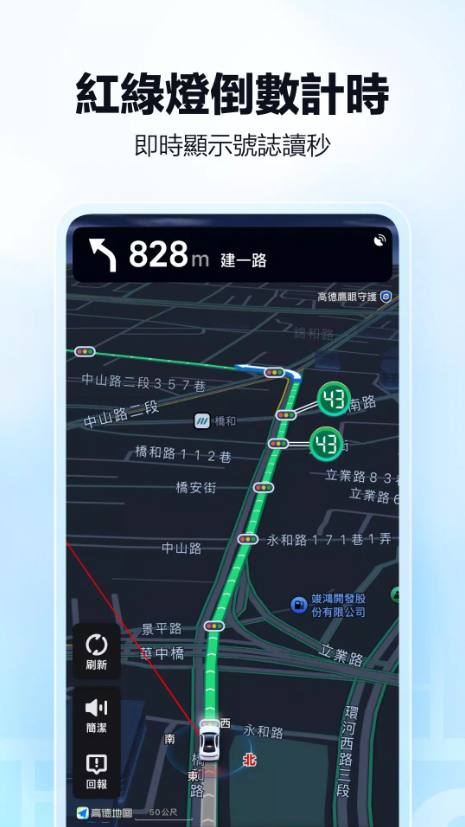
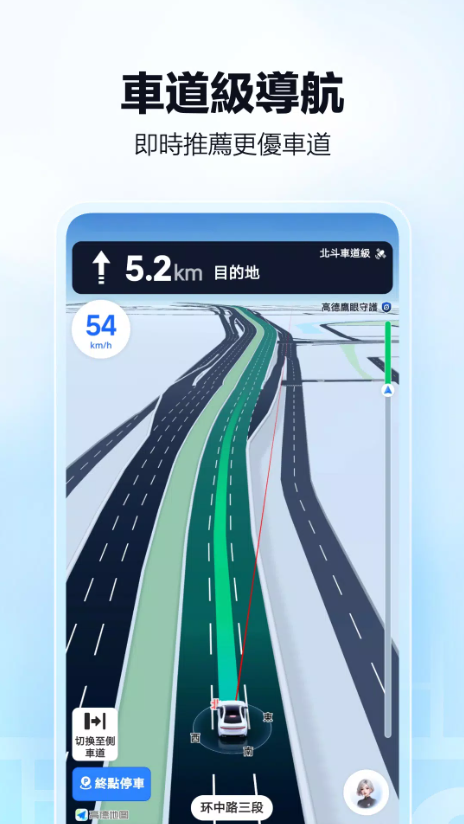
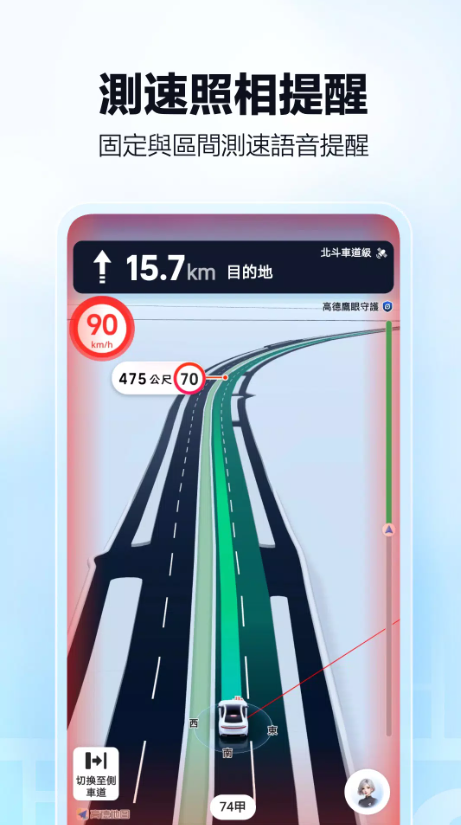

If you’ve lived in Taiwan for a long time, when it comes to navigation apps, most people’s first thought is definitely Google Maps. But if you’ve ever traveled, worked, or gone on a business trip to mainland China, you’ll quickly notice another name that pops up all the time—Amap. In recent years, Amap has not only gotten way more polished, with a full set of features like global map coverage, traffic navigation for Hong Kong and Macau, precise lane-level guidance, traffic light countdown alerts, and offline navigation, so 'Download Amap App' has gradually become a popular keyword that many Taiwanese users actively search for.
When I test and review map apps myself, I don’t just care if it can get me to my destination. Instead, I focus on several key areas: how accurate the location search is, whether the guidance at complex interchanges is clear, if real-time traffic conditions are actually useful, how practical walking and public transit routes are, and the often-overlooked location data and privacy permission management.
As of 2026, Amap is available for direct download on the Taiwan App Store, while Android users can install it via Google Play or official channels. This app does have a lot of standout features, especially when traveling to mainland China—there’s a pretty big difference in user experience compared to Google Maps. But Taiwanese users shouldn’t just jump to enable all permissions because 'the traffic light seconds are super accurate'—in 2026, Taiwan’s Ministry of Digital Affairs released related cybersecurity test results that sent clear warnings about Amap’s data collection and transmission practices.
Next, I’ll cover everything from the download and installation process, using it with Taiwanese phone numbers, the navigation features, all the way to cybersecurity issues. This way, anyone trying Amap for the first time can clearly see its pros, cons, and usage limits before deciding whether to install it.
1. Amap App Download Overview
(1) What is Amap (Positioning and Features)
Amap, often shortened to AMap, is a travel-focused app centered on map search, route planning, and navigation. It’s no longer just a tool that “navigates once you enter an address”—it has integrated a ton of features into one platform, including driving, walking, cycling, public transit, ride-hailing, EV charging, tourist spots, hotel bookings, and more.
One of Amap’s most impressive features is how well it handles navigation details.
For example, when approaching a complex interchange, it zooms in to show intersection info, marks lane directions, and alerts you in advance to turn left or right. On top of that, it has features like real-time traffic, traffic light countdown, and 3D navigation.
Right now, the official team is still expanding global map services. The version on Taiwan’s App Store is marked to cover over 230 countries and regions, so Amap isn’t just for use in mainland China anymore.
But from my personal use perspective, Amap’s biggest value is still in “navigation for mainland China and cross-border travel”, not trying to replace all local map tools in Taiwan.
(2) Compatible Devices and Supported Platforms (iOS, Android, Car Systems)
To get Download Amap App right now, you can mainly use:
iPhone
iPad
Android phones
Some Mac devices
Apple Watch
Car infotainment systems that support Amap
Apple devices can be downloaded directly from the App Store for now. Android users can download the official Android version, the Google Play version, or the version from app stores pre-installed on some mainland China-brand phones.
In addition, Amap has long been working in the car navigation field, and some Chinese-brand cars have already integrated Amap’s in-car services. If you rent a car for self-driving trips in mainland China, you’ll probably use this service a lot.
2. Amap iOS Version Download and Installation
(1) App Store Search and Download Steps
It’s actually pretty easy for Taiwanese iPhone users to download it now.
First, open the App Store and enter into the search bar:
Amap
or
AMap
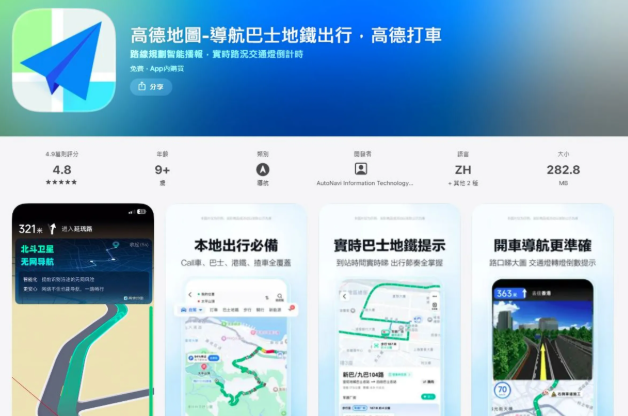
Right now, the app available on Taiwan’s App Store is called Amap - Navigation, Bus, Metro, and Rides, developed by AutoNavi Information Technology Co., Ltd.
Once you confirm the app name and developer are correct, just hit the “Get” button to install it.
Since September 2026, Amap has remained available for download on Taiwan’s App Store. It currently has a rating of around 4.9 stars, is nearly 300MB in size, and ranks near the top of popular navigation apps.
So there’s absolutely no need to look for third-party IPA files or so-called “Taiwan Special Edition” sources for Amap on your iPhone — just download it directly from the official App Store.
B. Installation and Basic Settings for iPhone & iPad
The first time you open Amap after installation, the system will usually ask for location permissions first.
If you just want to get familiar with the interface first, we recommend choosing “Allow While Using App” or a one-time location authorization — there’s no need to turn on all permissions right away.
When you actually start navigation, you can enable precise location features based on your needs.
As for notification permissions: if you use features like real-time traffic updates, arrival alerts, or trip planning, you can choose to enable them. But if you only use it occasionally for navigation when traveling, there’s no need to turn on all marketing notifications.
You can also install Amap on iPad, but in practical navigation scenarios, phones are more convenient. Tablets are great for checking routes and attractions on the big screen before a trip, but not as easy to use for navigation while driving.
III. Downloading and Installing Amap for Android
A. Download Process via Google Play Store
The easiest way for Android users is to download Amap from the Google Play Store.
Search for “高德地圖” or its English name “Amap” on Google Play, then confirm the developer and package details before installing.
Amap’s official website also provides a direct download link to Google Play, so for Android users with full Google services on their devices, Google Play is still the most recommended download channel.
The biggest advantage of installing from the official app store is that updates are much easier later on.
When Amap rolls out new navigation features, security patches, or bug fixes, you won’t have to manually search for APK files to update.
B. Third-Party App Stores and APK Download Methods
If your Android phone doesn’t have Google Play pre-installed (like some phones sold in mainland China), you may need to use your device brand’s official app store or APK files to install Amap.
Amap’s official website currently offers a download link for the stable Android version, as well as access to the Android test version.
If you really need to download an APK file, we recommend this priority order:
Amap Official Website > Device Brand Official Store > Major App Stores > Other Unofficial APK Websites
The reason is simple.
Navigation apps use permissions related to location and movement tracking, so downloading repackaged APKs from untrusted sources carries higher security risks.
Modified versions like “Amap Cracked,” “VIP Ad-Free,” or “Taiwan No Login Version” are strongly not recommended for download and use.
IV. Download and Registration Guide for Taiwan Users
A. Registration Process with Taiwanese Mobile Numbers (+886)
You don’t need to register an account the first time you use Amap — basic features like searching for places and planning some routes work without signing up.
But if you want to sync favorite places, save trips, use ride-hailing services, or access full personal features, you’ll usually need to log in and verify your phone number.
When converting a Taiwanese mobile number to international format, the country code to select is:
+886
Suppose your phone number is:
0912 345 678
The correct way to input it in international format is:
+886 912 345 678
This means you have to remove the leading 0 from your mobile number.
We want to note that Taiwanese mobile numbers may not work with the real-name verification feature required for some services under Amap or the Alibaba ecosystem. This isn’t a phone error or typo — it’s because of identity verification or regional restrictions built into the services themselves.
So if you’re just traveling to mainland China and need navigation, there’s no need to go through real-name verification for a small number of account features.
B. First-Time App Launch & Language/UI Settings
The 2026 release of AMap already supports a Traditional Chinese user interface.
Taiwan’s App Store currently offers multiple language options directly, including Traditional Chinese, Simplified Chinese, and English. This means regular Taiwanese users don’t have to guess how to operate the app from a fully Simplified Chinese interface.
After the first launch, I’ll first set up these key settings:
Language
Location
Navigation Voice
Distance Unit
Notifications
Offline Maps
to get these important settings sorted out.
This is especially important for anyone traveling independently in mainland China – we recommend downloading offline maps for your destination city via hotel Wi-Fi or before you depart.
There’s nothing more frustrating than being stuck without internet in an unfamiliar city, even more so than a not-so-great navigation app.
V
V. Comparing Official vs. Third-Party AMap Download Channels
A. Official Website Download Links & Version Notes
Right now, AMap’s official website offers multiple download options, including:
iOS
Android
Android Beta
Google Play
HarmonyOS
Car/In-Vehicle Version
download links for different platforms.
If you can’t find it on Google Play, we strongly recommend downloading directly from AMap’s official website. Never click on links labeled like "AMap 2026 Crack Download" – safety and stability are key here.
The beta version is for users who want to test new features early, but we don’t recommend it for regular travelers. For a navigation app, stability is the top priority – practicality beats testing new features any day.
B. Third-Party Download Channels (e.g., Appbao, Baidu Mobile Assistant, Xiaomi Store)
In the mainland China Android ecosystem, major brand stores like Appbao, Xiaomi App Store, and Huawei App Gallery are familiar download channels for users.
The benefit of these third-party channels is that you can install the app easily even if your phone doesn’t support Google Play Services. But if you’re in Taiwan, where Google Play is already available, there’s no need to download from mainland China’s third-party stores – they carry higher risks.
For APK platforms like Baidu Mobile Assistant, pay extra attention to the file publisher and version. Even if it’s labeled "AMap," the most important thing is whether the installer is the official original version, not just the latest version listed on the page.
VI. Troubleshooting Common Installation & Download Issues
A. Device & System Compatibility Issues
If you can’t install the app after downloading, don’t rush to re-download the APK. The most common reasons are:
Outdated Android system version
Insufficient storage space
Incompatible APK architecture
Residual files from old app versions
System settings blocking installs from unknown sources
For iPhone users, issues are usually related to iOS version or Apple ID region settings. Also, note that AMap is about 300MB on its own, but total storage used will be larger after downloading offline maps. So if your phone only has 300 or 400MB free, even if the App Store says it’s available, installation may not work.
B. Fixes for Regional Restrictions & Store Display Issues
Right now, AMap is available on Taiwan’s App Store, so iPhone users usually don’t need to switch to a mainland China Apple ID. If you can’t find it, try searching for "AMap" or the full app name again.
For Android users, we recommend checking your Google Account’s store region settings, Google Play Services version, and device compatibility.
We don’t recommend changing your Apple ID’s region repeatedly just for a navigation app – this could affect your existing subscriptions, payment methods, or even your store account balance. It’s safest to use the version available directly from Taiwan’s App Store.
VII. Must-Adjust Settings for First Use
A. Language Switching & Traditional Chinese UI
Traditional Chinese is a core feature of AMap’s overseas versions, but some mainland China store names, road data, or user reviews (UGC) might still show Simplified Chinese. This isn’t a language setting issue – it’s because the original map or business data is in Simplified. If you’re mainly using the app in Beijing, Shanghai, Shenzhen, or Guangzhou, this difference won’t matter much. Keeping addresses in their original names is actually easier for hailing rides or searching.
B. Location Permissions, Notifications & Background App Refresh Settings
Here's my strong advice: don't just click "Allow" for every permission prompt. Navigation apps actually only really need location access—precise location for walking or driving directions. You can turn on background location permissions only when you need voice navigation updates even when the app isn't open.
As for permissions like contacts, photos, and microphone, you should decide on a case-by-case basis based on whether you actually use those features.
For example: if you don't use voice typing, you don't need to grant microphone access. If you never share photos, there's no need to give full album access long-term. And if you don't need friends or social features, don't just open contacts permissions for convenience. For navigation apps, cutting down on unnecessary permission requests is usually more important than extra features.
VIII. Overview of Core Navigation & Travel Features
A. Route Planning & Multi-Mode Navigation (Driving, Walking, Bus, Subway)
What Gaode is best known for is its versatile, mature multi-mode route planning feature. The common navigation modes right now include:
Driving
Walking
Cycling
Bus
Subway
Motorcycle
New Energy Vehicle
Ride-Hailing
The PC web version can also plan routes for driving, bus, walking, and cycling based on real-time traffic, distance, and time.
When traveling in mainland China, my go-to is actually not driving—it's "walking + subway".
That's because many attractions have tons of exits, making it super easy to get lost.
Google Maps might just tell you where the subway station is, but Gaode usually handles station exits, mall entrances, and walking transfers much more carefully in mainland China.
B. Real-Time Traffic & Lane-Level Navigation
What really sets Gaode apart from other maps is its navigation screen design.
On complex roads, it zooms in on roads, lanes, and turn directions, so you know exactly which lane to get into well in advance.
In particular, mainland Chinese cities often have:
Elevated roads
Underground tunnels
Multi-level interchanges
Left-turn only lanes
Multiple consecutive exits
On these kinds of roads, just hearing "turn right ahead" makes it way too easy to get in the wrong lane.
Lane-level navigation visualizes this info directly, which is super helpful for anyone driving in a new city for the first time.
IX. Download Value for Cross-Border & Independent Travel in China
A. Must-Have Navigation App for Traveling or Working in Mainland China
If you're just living in Taiwan and commuting daily, I wouldn't say Gaode is definitely worth installing over Google Maps.
But once you're planning a trip to mainland China, my recommendation flips totally:
At least download Gaode Maps as a backup.
It's not just about navigation features.
Gaode has more complete and up-to-date info on restaurants, malls, attractions, subway entrances, neighborhoods, and local shops all across mainland China.
It also integrates bus, subway, ride-hailing, and walking routes, making it super easy to plan your whole trip.
For example, if you're going from your hotel in Shanghai to a restaurant on the 4th floor of a mall, Gaode is way more useful than just knowing where the mall is.
B. Differences & Advantages Over Google Maps in Mainland China
Google Maps is really strong globally, and I still rely on it myself especially for trips to Taiwan, Japan, and North America/Europe.
But in mainland China, things are different.
Gaode has more complete data on mainland China's roads, real-time traffic, public transit, local POIs (points of interest), and daily life info, plus more navigation features built specifically for local road conditions.
Google Maps' biggest strengths, on the other hand, are global data, its review ecosystem, and cross-border trip planning abilities.
So here's how I'd pair them:
Taiwan & most international trips: Google Maps first.
Independent travel in mainland China: Gaode Maps first, other maps as backup.
This is way more practical than arguing which one is "the best globally".
X. Traffic Light Countdown & Important Things to Know Before Downloading Advanced Features
A. Traffic Light Seconds Display & Real-World Usage
In 2026, Gaode got a lot of attention in Taiwan, and one big reason is its traffic light countdown feature.
When navigation is approaching certain intersections, Gaode shows how many seconds are left for red or green lights.
It feels really amazing when you first see it.
But here's something important to clarify:
In April 2026, Taiwan's Ministry of Transportation publicly stated that the government does not provide real-time traffic light seconds data to Gaode, and TDX (Taiwan Data eXchange) also doesn't have a related signal seconds API; this signal control data uses internal systems that external apps can't access directly.
Gaode itself
its privacy and service policy states that it will use user location data and other information for statistics and analysis, applied to functions like traffic light countdown, road condition monitoring, and smart traffic information evaluation.
In other words, seeing an accurate countdown can help with navigation, but don’t treat it as official traffic signal data.
When you’re actually driving, always follow the real-world traffic lights on site.
B. Advanced Features: 3D Street View, Offline Maps, EV Charging Maps
Amap’s navigation features have actually become much richer in recent years.
First up is 3D navigation.
Complex interchanges, buildings, and roads are displayed in 3D, making them easier to understand than traditional 2D maps.
Next is the offline navigation function.
The 2026 version further enhances "non-internet navigation", allowing more offline capabilities for scenarios like subway, walking, and cycling in some modes.
Moving on to new energy vehicle-related features.
Searching for "charging maps" directly lets you find charging stations and related info. Amap also lists charging piles as key data for daily life and travel services.
If you rent an electric car for self-driving in mainland China, this feature will be way more practical than just searching for "nearby charging stations".
Taiwanese users planning to download Amap in 2026, you really need to read this info carefully.
After all, map apps are different from other ordinary tools—their involvement with personal data makes them more sensitive by nature.
For example, location data accumulated over time: when you leave home, your daily commute route, spots you often visit at night, weekend dinner spots—all this can piece together a pretty full picture of your daily routine and movement patterns.
Amap’s official privacy policy clearly states that navigation and location services may process dynamic location, IP address, GNSS (satellite positioning), Wi-Fi, Bluetooth, device sensor data, plus navigation start/end points and full route details.
So, I don’t really agree with the casual attitude of "it’s just a map, what’s there to fear?"
The real concern isn’t single events like visiting Taipei 101 one day—it’s the personal privacy info that gets built up over months or years of overlapping movement records.
XI. Cybersecurity Risks and Notes for Downloading & Use
A. Risk of Personal Data Sent to Servers & Movement Tracking
On May 27, 2026, Taiwan’s Ministry of Digital Affairs’ Information Industry and Safety Administration officially released cybersecurity test results for 4 apps, including Amap.
The results showed Amap has multiple cybersecurity risky behaviors: requesting sensitive permissions unnecessary for core features, unnecessary background data transmission, and transferring user data to servers in mainland China. The administration further noted that long-term accumulation of location and personal info could raise risks of analyzing a user’s movement patterns, home address, and work location.
So the Ministry of Digital Affairs advises people to avoid installing or using apps judged high-risk for cybersecurity; if you really need to use it, at least read the privacy policy carefully, limit permissions to only what’s truly needed, and regularly check your device’s authorization settings.
On this matter, I also don’t recommend leaning to either extreme.
Don’t think "installing this app will definitely hack your phone" just because of a cybersecurity warning, and don’t ignore all privacy concerns just because the navigation works well.
A more practical approach is:
Evaluate whether to install/use it based on travel or specific navigation needs;
Turn off all non-essential permissions;
Don’t use background location if you don’t need it for long periods;
Uninstall the app after your trip if you don’t have continued use;
For devices issued by government agencies, follow current government cybersecurity rules—never install apps on your own.
XII. Comparison Between Amap & Other Map Apps for Downloading
A. Functional Differences Between Amap, Google Maps, Baidu Maps
If we compare these three map apps—Amap, Google Maps, and Baidu Maps—here’s how I’d analyze their positioning.
Google Maps:
Its biggest plus is global availability. Whether in Taiwan, Japan, Southeast Asia, or Europe/America, the experience is stable; plus the local info ecosystem (reviews, real photos) is solid—super handy for finding restaurants or spots daily.
Amap:
Its strengths are mainly in traffic and navigation experience in mainland China: lane-level navigation, traffic light countdown reminders, complex road condition prediction, real-time public transport info, ride-hailing services, and more...
It has deeply integrated features related to new energy vehicles.
Baidu Maps:
It’s also a major map service in mainland China, with complete search functions and local information. In some scenarios, it can serve as an alternative to Amap. If you live mainly in mainland China, it’s recommended to use at least one of Amap or Baidu Maps. If you live primarily in Taiwan, there’s actually no need to completely delete Google Maps just to chase more features.
B. Choose the Right Navigation App Based on Your Use Case
Finally, I’ve simplified the selection principles even further.
Daily Use in Taiwan:
Google Maps is still my top recommendation. Its location data, store reviews, public transit info in Taiwan, and cross-device syncing features all align better with most people’s daily habits.
Self-Guided Travel in Mainland China:
Amap is definitely worth installing, especially if you need to take the subway, find mall entrances, book ride-hailing services, or when navigating complex roads for the first time—its advantages over other maps will be immediately obvious.
Driving in Mainland China:
Amap’s strengths really shine here. Lane-level navigation, intersection close-up views, real-time traffic updates, and new energy vehicle-related features are all super useful.
For Privacy-Focused Users:
Before you decide to download the Amap app, you need to take into account the cybersecurity test results released by Taiwanese authorities in 2026—not just how strong its navigation functions are. Whether a tool is good is one thing; whether you’re willing to share the necessary personal data is another.
Next, let’s break down the key points. Based on the latest 2026 version, if we only measure by “navigation capability,” Amap is indeed a quite distinctive map app.
From lane-level navigation, voice prompts for complex intersections, traffic light countdowns, real-time traffic updates to public transit (bus and subway) navigation, offline maps, and even new energy vehicle charging station info—almost all navigation-related needs are met in one app. If you’re traveling or doing business in mainland China, the convenience of actually using it often exceeds what first-time users expect.
For users in Taiwan, downloading the Amap app is much easier now than before: iPhones and iPads can be installed directly through the Taiwan App Store, and Android devices have legitimate download channels from Google Play and Amap’s official sources. There’s no need to risk installing APK files from unknown sources to avoid potential cybersecurity risks.
But the thing I want to remind everyone most in this review isn’t where to download it.
It’s this:
Just because you can download it doesn’t mean you should enable all permissions.
Navigation apps naturally need location data to work, but in 2026, Taiwan’s cybersecurity authority publicly issued a warning about Amap, pointing out potential risks of data collection and cross-border transmission. So Taiwanese users have to choose for themselves between convenience and protecting their personal data.
If you’re just taking short trips or business trips to cities like Shanghai, Shenzhen, Guangzhou, or Beijing occasionally, I’d position Amap as a “backup tool for self-guided travel in China”: download the app when you need it, set permissions carefully, and decide whether to keep it after your trip ends.
If you mainly navigate in Taiwan every day, I’d still recommend Google Maps first.
But if your next trip is to mainland China and you want to avoid missing exits or taking the wrong subway, Amap is definitely worth taking some time to check out before you leave. Just don’t only focus on useful features like traffic light countdowns—also take a minute to check what permissions your phone has granted to Amap, and protect your personal data.